The grid is not treated as a report with editing added later. It is the principal work surface: selection, lookup, bulk operations, validation, master-detail context, change tracking, and save all converge there.
The framework inherits because the platform is still valuable.
Stock DataGridView provides mature binding, virtualization, edit lifecycle, keyboard behavior, designer integration, and direct compatibility with DataTable and DataView. Replacing it would mean reproducing a large, battle-tested surface. The framework instead addresses the exact deficiencies encountered in data-intensive applications.
GridViewBase owns low-level painting, double buffering, sizing, mouse and keyboard routing, dirty-edit protection, and the hook through which configured cells are created. GridViewV adds live entity-view semantics: filtering, sorting, current-row behavior, selection tracking, and master-detail movement. GridViewPvt rotates the same model into property/value rows for wide entities.
CellCtrl separates the cell from the grid that hosts it.
A cell selected from configuration cannot assume a particular module or concrete container. CellCtrl defines the contracts ICellCntnr, ICellDefined, and ICellSetRW. Through those contracts, a cell can ask for its current column, read-only state, definition, target row, and refresh behavior without referencing CtrlG directly.
This indirection matters because DataGridView clones cells frequently. Configuration and behavior must survive cloning, editor activation, sorting, and view refresh. A cell is therefore both a visual object and a participant in a larger runtime contract.
Rendering, value conversion, editor creation, and metadata interpretation remain close to the cell type.
Read-only state, active column, bound row, command scope, and refresh belong to the hosting grid.
The cell requests context through interfaces rather than depending on one concrete grid implementation.
A field definition selects the appropriate cell behavior at runtime instead of a compile-time enum.
Hosted editors solve the limits of stock grid cell types.
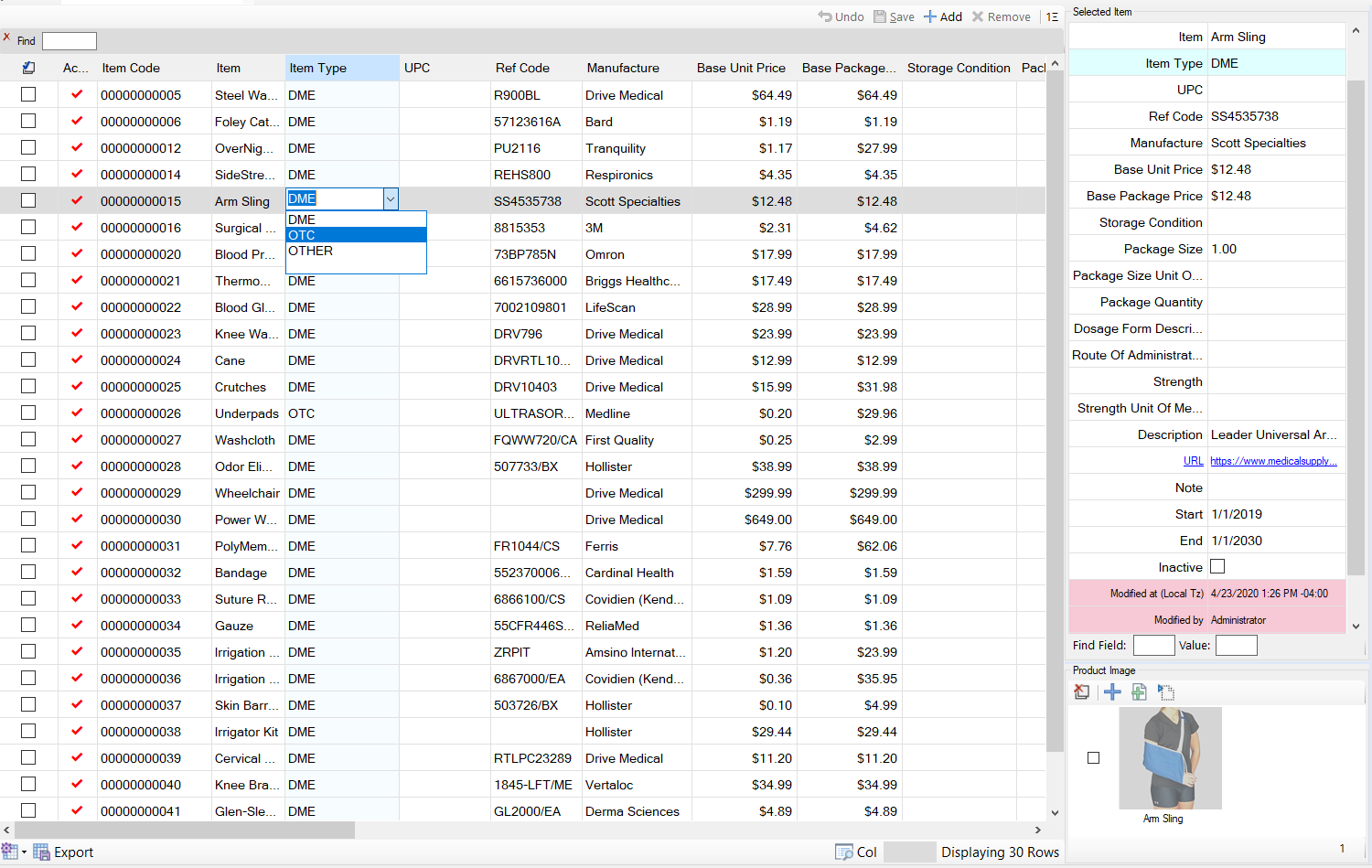
Text, checkbox, combo, and calendar cells are not enough for complex business data. Search controls, lookup composites, nullable date editors, assisted text, and context-aware pickers need to run inside the grid while still obeying its focus, validation, commit, cancel, cloning, and disposal rules.
CellCtrlEdtrBase defines the editing bridge. CellCtrlEdtr supplies the general hosted-control lifecycle. Concrete variants add lookup, free-text lookup, date, and column-aware behavior. A separate editing control may be required because DataGridView distinguishes the persistent cell object from the temporary live editor.
| Cell type | Why it exists | Contribution |
|---|---|---|
CellCtrlEdtrBase | Every hosted control must obey the DataGridView editing contract. | Shared initialization, focus, value transfer, commit, cancel, clone, and disposal mechanics. |
CellCtrlEdtr | Business editing requires controls beyond the stock cell set. | A general host that turns a configured control into a working cell editor. |
CellCtrlEdtrCl | Some editors derive behavior from the configured column definition. | Column-aware initialization while preserving common editor mechanics. |
CellCtrlCB | Lookup columns store identifiers but users select descriptions. | Dataset binding, id/display separation, null handling, and drop-down sizing. |
CellCtrlCBTxt | Some vocabularies guide selection but still permit valid free text. | Hybrid lookup and controlled text entry without a module-specific editor. |
CellCtrlDTP | Business dates require calendar interaction and true null semantics. | Nullable DateTimePicker behavior inside the grid. |
CellCtrlDPTEditingDTP | The temporary calendar editor must report dirty state and keyboard behavior to DataGridView. | The concrete editing-control adapter used while a date cell is active. |
A header is an active command surface, not only a label.
Bulk selection and column-scoped actions belong at the column they affect. Moving them to a distant toolbar weakens context and consumes screen space. The active-header family embeds hit-tested behavior into the header while delegating sorting and set operations to the view.
| Header type | Why it exists | Contribution |
|---|---|---|
CellCtrlHeaderBase | Custom header metadata and behavior must survive DataGridView cloning and repaint. | Configuration retention, style resolution, sizing, and shared interaction hooks. |
CellCtrlActiveClHeader | Headers need active regions for sorting and contextual commands. | Hit testing, rendering, command routing, sorting delegation, and width calculation. |
CellCtrlChkClHeaderBase | Bulk toggles need reusable tri-state and visible-set semantics. | Checkbox rendering, hit area, state calculation, and bulk-toggle delegation. |
CellCtrlChkClHeader2 | Configured grids need a ready select-all implementation. | Concrete toggle and refresh behavior over the current filtered working set. |
Pointer and support types preserve intent across a changing view.
A row index is not an identity. Sorting, filtering, insertion, or a master-detail refresh can change a record's visual position. The pointer family packages location, row context, and scroll intent so navigation and editing can restore the logical target after the view changes.
| Support type | Why it exists | Contribution |
|---|---|---|
CellPntr | Loose row and column integers lose intent and are easy to exchange accidentally. | One comparable logical cell coordinate. |
CellRWPntr | A visual row index does not survive sorting and filtering. | A pointer anchored to row context that can be resolved again. |
CellPntrScroll | Restoring focus without restoring visibility leaves the target off screen. | Cell targeting combined with viewport intent. |
CellPreviewMouseFilter | Hosted controls can consume mouse input before the grid establishes context. | Early input interpretation and routing for the correct current cell. |
CellCBController | Lookup refresh and synchronization should not live in cloned cell objects. | Coordination of lookup datasets, dependency refresh, and id/display state. |
CellCtrlException | Dynamic editor failures need cell and metadata context to be diagnosable. | A contextual failure boundary for activation, binding, and conversion problems. |
IndexedDisplayBehavior | Users see descriptions while relational fields retain identifiers. | Reusable stored-value/display-value indirection. |
Design-time support is deliberately separate from runtime cells.
GridViewBaseDesigner, GridViewPvtDesigner, GridViewDesigner, and CtrlDesigner are Visual Studio designers applied through Designer attributes. They control how inherited, runtime-owned controls behave on the design surface. They are not cell classes and do not participate in runtime editing.
This separation protects configured collections and runtime-created children from unsafe designer serialization while still allowing developers to compose framework controls visually where appropriate.
CtrlG integrates the grid into the complete framework runtime.
A grid primitive does not know the database contract, command registry, security context, save path, or composite validator. CtrlG adds those concerns at the data-driven UI layer: it binds the configured table, creates cell types from metadata, maintains selection through refilters, exposes the StatusValidator property typed as WFValidator, coordinates master-detail context, and prepares changes for the DAL.
CtrlGBase owns shared binding and command behavior; CtrlGController keeps orchestration outside the visual control; CtrlP and CtrlPvtG reuse the same engine for pivoted presentation; and CtrlCenteredGrid solves the layout case where a narrow configured grid should not stretch awkwardly across its host.
Next: see the composites built above the grid.
Universal views, editor groups, cross-reference engines, logging, toolbars, and form families turn the editing primitives into complete application capabilities.