Publication note. I.T.S. reviewed the production captures in this article before publication. Confidential information was removed. Employee names that remain visible in audit fields are non-confidential and also appear in public corporate records.
Configuration boundary
Who Configures What?
Within ITS Framework, the database is the universal contract for configurable behavior: the application does not contain a separate hard-coded rule for every screen; it reads the rules it needs. Form structure, grid columns, cell styles, panels, module navigation, reports, validation, and access are described as governed data. The interface composes configured controls recursively, and SQL results map to those controls through shared runtime conventions.
Framework configuration: administrator or developer
This level defines the reusable scaffolding that the runtime interprets.
- Define entity types and business classes, then determine which editors each one exposes.
- Declare each editor's reusable control, data contract, category, properties, validation, and effective access.
- Extend an entity by changing its relational schema, query contract, and metadata rather than adding another DTO, ORM mapping, or compiled form. The
DataRowremains the runtime entity and changed rows return through structured persistence. - Configure validation rules, localized messages, and dialog behavior through one shared message mechanism.
- Resolve permissions consistently across the module, editor, active class, and current read-only state.
Business configuration: end user
Within those governed boundaries, users own the catalogs and operating choices that shape daily work.
- Create and maintain master lists such as document types, departments, titles, markets, labels, insurance types, and other business vocabularies.
- Add, edit, reorder, activate, or retire the items in those lists without changing application code.
- Maintain the available business actions that govern what operations may be performed.
- Activate or deactivate an entity's class memberships so the correct editors and capabilities follow the current business role.
The distinction is deliberate: administrators and developers define the configurable grammar; end users supply and govern the business vocabulary. In both cases, changing governed data changes behavior consistently across the platform without waiting for a newly compiled application release.
The Architectural Problem: Every Noun Becomes a Screen
Most enterprise applications begin with a reasonable set of maintenance forms: users, providers, customers, facilities, carriers, job titles, address types, and security groups. The trouble appears as the business grows. Each new noun tends to become another form, another set of fields, another permission path, another validation routine, and another save implementation.
The duplication is not always obvious because the screens look different. Yet they repeat the same underlying questions:
- What kind of thing is this record?
- Which capabilities apply to it?
- Which properties and specialized editors should be visible?
- What may the current user view or change?
- How are edits validated and persisted?
Entity Management treats those questions as one runtime contract. The stable code knows how to load an entity, resolve its capabilities, compose editors, bind data, enforce access, display validation, and save changes. The database supplies the vocabulary that varies from one application to another.
An entity is not a synonym for a person. It is anything the business needs to identify, classify, describe, relate, secure, or maintain.
The Conceptual Model
The model depends on separating concepts that are often collapsed into one class hierarchy. An entity has one structural type, may participate in several business classes, and receives editors from both. Master lists use the same machinery rather than a parallel catalog subsystem.
ENTITY
  +-- has one ----→ TYPE
  |                  +-- exposes base properties
  |                  +-- contributes type editors
  |
  +-- has many ---→ ACTIVE CLASSES (membership)
                       +-- contribute class editors

AVAILABLE EDITORS
  = type editors
  + editors from every active class
  - editors prohibited by effective access
This separation matters. Type answers what an entity fundamentally is. Class answers which roles or capabilities it currently has. Editor answers how one area of that entity is viewed or changed. Membership is the entity-specific set of active classes.
Entity: The Managed Thing
An entity is the identifiable record being managed. It has an identity such as id and name, an entity type, optional image data, editable properties, and a membership. The same abstraction can represent a person, a facility, an insurance carrier, a security group, a market, an address type, or another business concept.
At runtime, the framework's Entity object wraps a DataSet rather than translating the record into a separate domain-object graph. That package carries three concerns together:
- The entity record and its editable values.
- The applicable classes and their active membership state.
- Validation errors that the interface can associate with properties or editors.
The visible record remains relational throughout the path. EntityV binds to the relevant DataTable and DataRow; edits use DataRowState and DataRowVersion; persistence sends structured changes back through the DAL. The Entity class coordinates the package, but it does not replace the database contract with a second model.
Entity Type: Structural Identity
Every entity belongs to one type. The two fundamental types in the framework are Person and Facility. Type determines the entity's structural baseline: its default image, base properties, and the editors that apply to every entity of that type.
| Entity type | Structural meaning | Possible examples |
|---|---|---|
| Person | A human identity with person-oriented properties | User, provider, client, covered member |
| Facility | An organization, location, or institutional identity | Hospital, network, pharmacy, carrier, bank |
| Master List | A governed catalog maintained through the entity runtime | Address type, job title, market, status |
A type is not the complete business definition. Two people share a structural baseline without sharing the same capabilities. One may be a user and provider; another may be a client and covered member. The framework therefore keeps type stable and expresses changing business roles through classes.
Configuration tables such as ETypeXEdtr and ETypeXPCl connect a type to its editors and property classes. These rows let the database describe what the runtime should materialize without teaching the Entity Management module about each application-specific type in code.
Entity Class: Business Capability, Not Object Inheritance
An entity class is an applicable business role or capability. It is not a .NET base class, and it does not force one entity into one branch of an inheritance tree. A single entity may activate several classes at the same time.
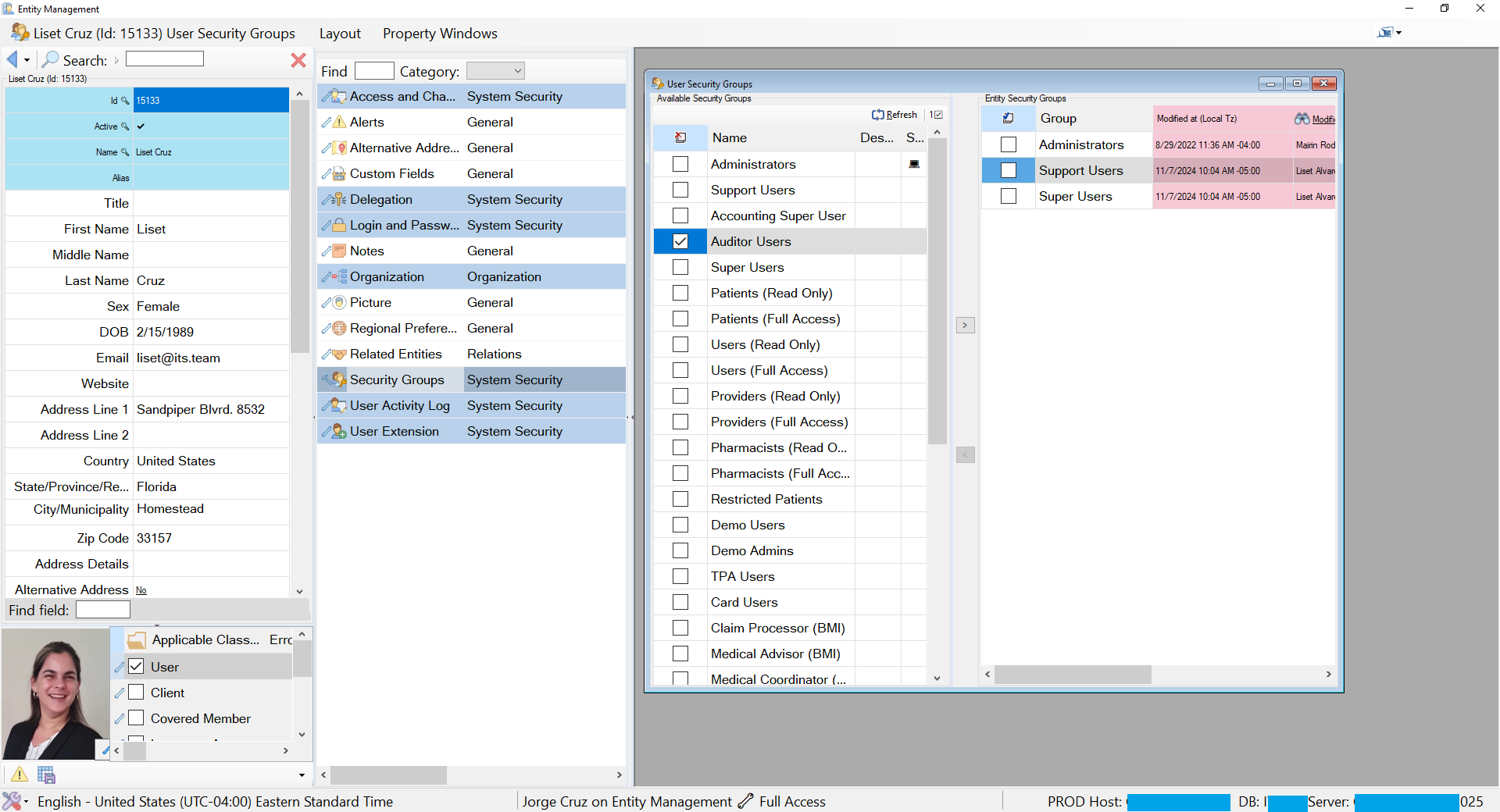
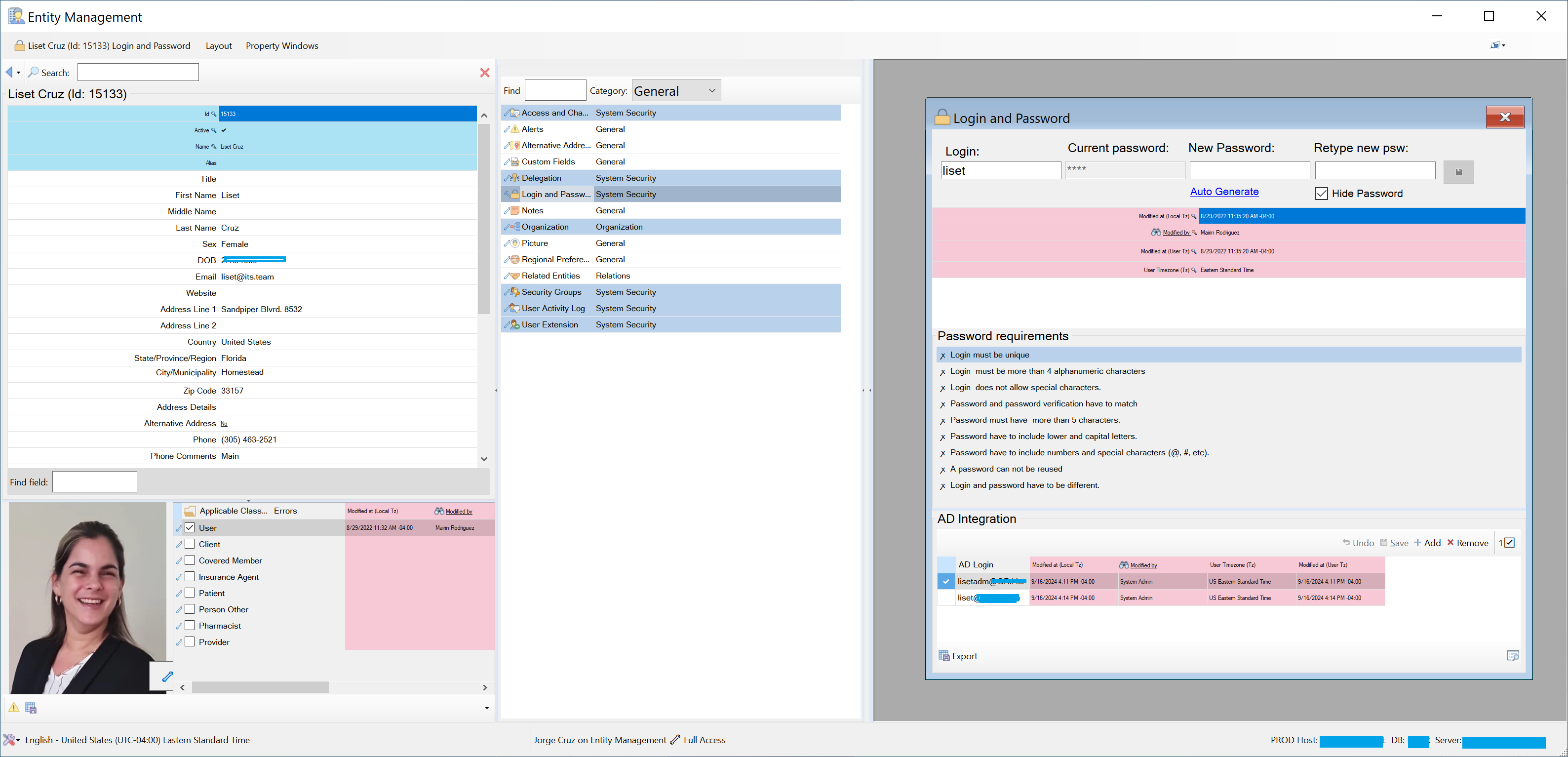
- A Person with the User class can receive Login and Password, Security Groups, Delegation, Organization, and User Extension editors.
- A Person with the Provider class can receive a Licenses editor.
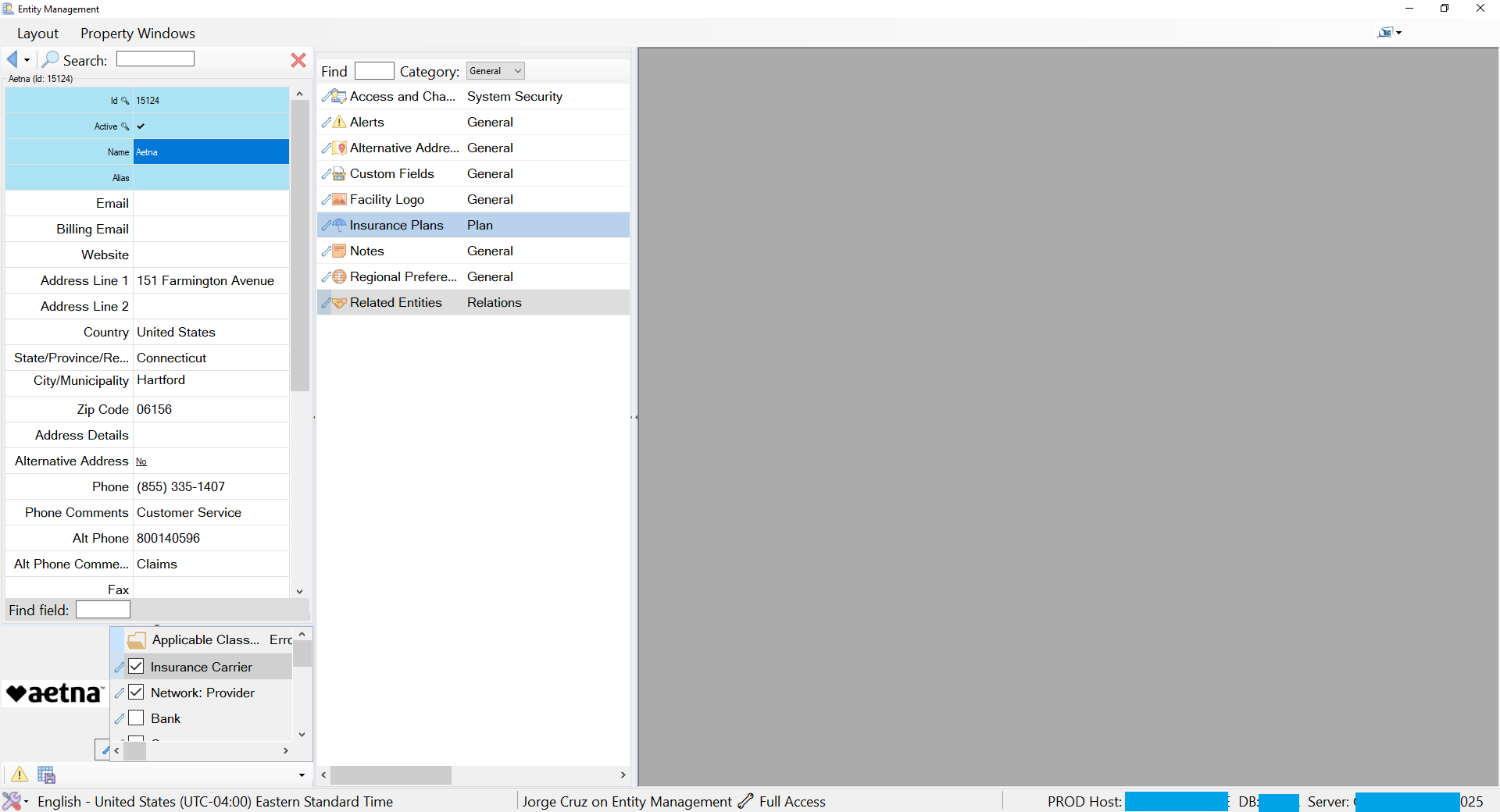
- A Facility with the Insurance Carrier class can receive an Insurance Plans editor.
- A Facility can also be a Network, Pharmacy, Hospital, or Bank when those capabilities apply.
The active set of classes is the entity's membership. Turning a class on or off is a business operation with visible consequences: after the membership is saved, the editor catalog is resolved again. Newly applicable editors appear; editors that no longer apply disappear.
This gives roles a concrete operational meaning. Checking User does more than attach a label to a person. It grants the entity the configured data surfaces and behaviors that make a user manageable.
Editor: Configured Behavior in a Reusable Workspace
An editor is a focused control for viewing or changing one aspect of an entity. Login and Password, Security Groups, Organization, Licenses, Related Entities, and Insurance Plans are editors. Each can own a dataset, commands, validation rules, and persistence behavior appropriate to its job.
The database describes which reusable control should be instantiated, the named dataset that feeds it, the category under which it appears, and the type or class that makes it applicable. The runtime supplies lifecycle and hosting; the editor supplies the specialized interaction.
Editor configuration
  name          = "Security Groups"
  category      = "System Security"
  applies via   = Person + active User class
  control       = reusable security-group editor
  data contract = named DAL dataset
  access        = resolved module/editor/membership level

Runtime result
  Person without User  → editor absent
  Person with User     → editor available
  Unauthorized user    → hidden or read-only
Configuration cannot eliminate code entirely. A genuinely new interaction still needs a well-designed reusable editor implementation. The leverage appears after that mechanism exists: many entity types and classes can select it through data, avoiding another copy of the same screen logic.
How the Runtime Resolves an Entity
Opening an entity is a staged composition process, not navigation to a hard-coded form and not a request for every property the entity could possibly expose. The initial load brings back the defining entity row, its basic fields, its applicable classes, and the membership state needed to understand what the entity is.
The framework then uses configuration to resolve which editors apply to the entity type and which additional editors are contributed by its active classes. That resolution builds the editor catalog in CntrlVEdtrs; it does not load the datasets and properties behind every editor in the catalog.
INITIAL ENTITY LOAD
SQL Server: defining row + basic fields + applicable classes
                              ↓
Entity: core DataRow + membership state
                              ↓
Configuration resolver:
type editors + active-class editors + security
                              ↓
EntityV + CntrlVEdtrs: core view and editor catalog only

ON EDITOR OPEN
Selected editor
      ↓
Resolve its configured properties and named DataSet
      ↓
DAL loads and prepares that editor's data
      ↓
Instantiate + bind + secure the editor
      ↓
Changed DataRows → validation → structured save → SQL Server
Performance: Resolve First, Load on Demand
An entity may qualify for many editors, but a user normally works with only one or two during a session. Loading every editor dataset with the entity would increase SQL work, memory consumption, binding cost, and initialization time for data the user may never inspect.
Entity Management therefore pays the initial cost only for the entity's core row and membership. Each editor pays its own data cost when it is opened. Its configured named dataset can still return several related tables in one deliberate contract, and configured caching can still serve reusable reference data; on-demand loading does not mean issuing one query per property.
Performance principle: resolve editor applicability up front, but load an editor's properties and working data only when that editor is selected.
The result remains dynamic without making initial entity loading proportional to every capability the entity might have. The same compiled module can present a person as a security identity, provider, or client; present a facility as a carrier or network; and present a master list as a small catalog or a composed maintenance application.
The Three-Panel Workbench
Entity Management makes the conceptual model visible through three cooperating areas inside its MDI child form.
| Area | Runtime control | Responsibility |
|---|---|---|
| Entity view | EntityV | Searches and loads the entity; shows its identity, image, properties, and applicable classes. |
| Editor catalog | CntrlVEdtrs | Lists the editors resolved from type and membership, grouped and filtered by category. |
| Editor workspace | Selected editor control | Loads the selected editor's configured dataset on demand, then hosts and binds the specialized control. |
The layout is stable while the content changes. On the left, a user can search, inspect core properties, and alter applicable classes. In the center, the runtime displays only the editors relevant to the loaded entity and security context. On the right, the selected editor opens into a shared workspace.
This consistency reduces training cost. Users learn one navigation grammar—find the entity, understand its classes, choose an editor, make changes, save—even when the business subject is different.
Master Lists Use the Same Runtime
Enterprise applications depend on catalogs: address types, alert types, insurance types, job titles, labels, markets, medical conditions, plan groups, and many others. These lists are often scattered across settings screens or embedded as constants. Entity Management treats them as governed data.
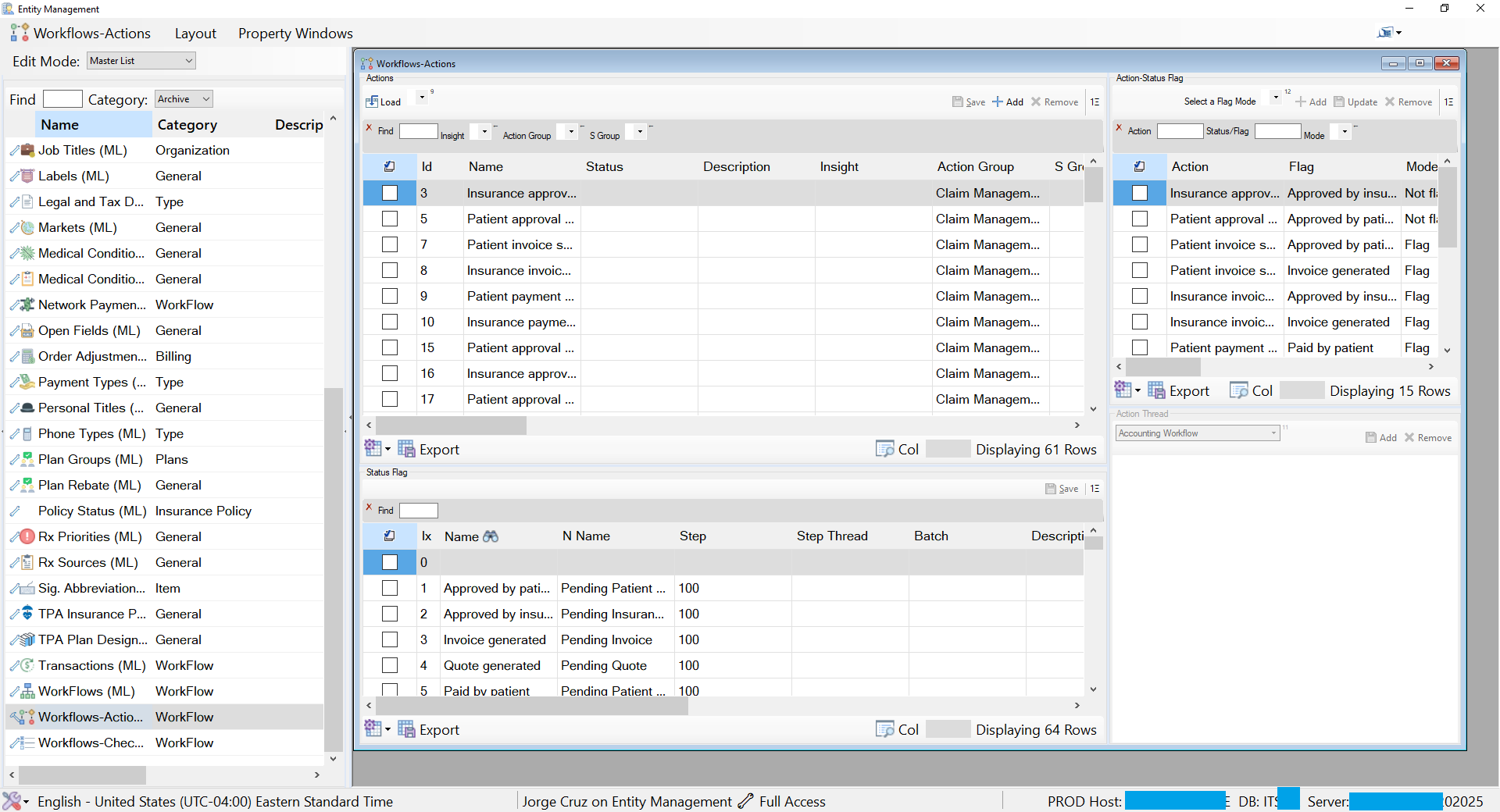
A simple master list is a flat catalog with familiar operations such as add, remove, refresh, save, and export. A complex master list can compose several related views: for example, a workflow catalog may manage actions, status flags, action-to-flag mappings, and thread rules in one configured workspace.
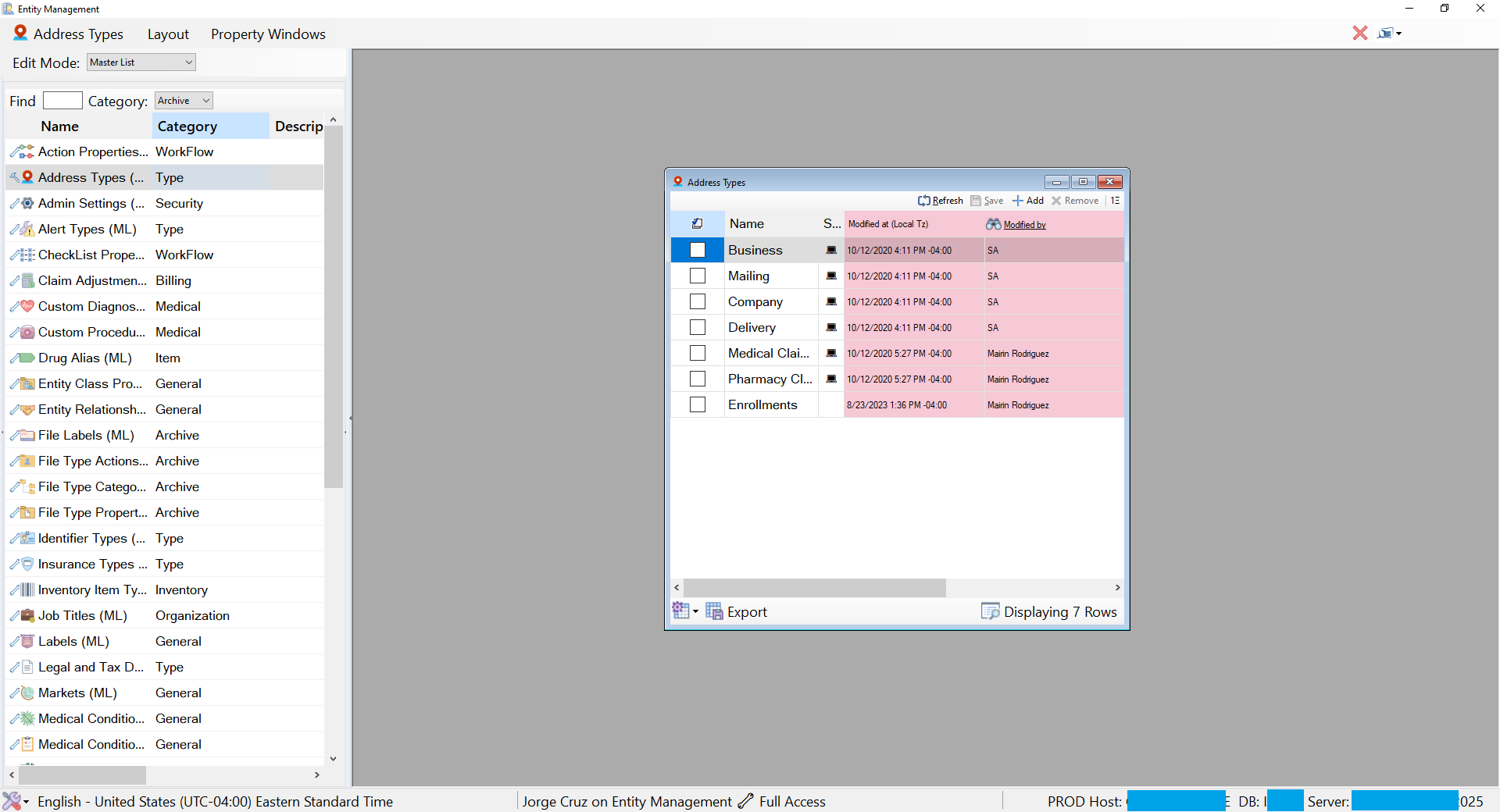
The important point is not that every catalog looks identical. It is that both simple and complex catalogs use the same framework contracts. Once the necessary reusable controls exist, adding a list is primarily a matter of defining its data, views, properties, and relationships. A new property may require an ALTER TABLE and a revised SELECT, but not another maintenance application.
Access Is a Resolved Constraint
Showing an editor because it applies to an entity is only half of the decision. The runtime must also determine what the current user may do with it. Effective access is the most restrictive applicable level:
effective access = minimum(
    module access,
    editor access,
    membership/class access,
    current read-only state
)

result = hidden | visible read-only | editable
The same entity can therefore produce different screens for different users. One user may edit Security Groups, another may inspect them without changing anything, and another may not see that editor at all. The interface reflects the result through visible editor availability, read-only state, and access indicators.
This model avoids treating authorization as a final button check. Access participates in composition from the beginning: it affects which editors resolve, which properties are editable, and which commands can execute.
Validation and Persistence Stay with the Data Contract
Changes in Entity Management remain attached to the same runtime data package that drives the interface. Direct binding means the current DataRow carries edited values and native row state. Validation can associate errors with the affected property or editor, and the module can prevent persistence until the package is valid.
A typical save path is:
- Collect changed entity, membership, and editor rows.
- Run database and framework validation against the current package.
- Return errors to the validation table and mark the affected UI surfaces.
- When valid, send structured changes through stored procedures using UDTT or XML parameters.
- Accept the saved state and resolve the editor catalog again when membership changed.
The framework does not need DTOs and mapping layers between the WinForms UI and SQL Server for this internal path. The database remains authoritative; the DataSet is the runtime package; the DataTable carries schema and rows; and the DataRow is the runtime entity.
What Changes When the Business Adds a Capability?
Consider a request to manage professional licenses for providers. In a form-per-noun architecture, the team might add fields to a provider form, write permission checks, create validation, wire persistence, and repeat the same changes anywhere providers appear.
In Entity Management, the work is divided by architectural responsibility:
- Reuse or implement one Licenses editor with a clear data contract.
- Register the editor and its category.
- Map it to the Provider class through membership-to-editor configuration.
- Define the dataset, properties, access, and validation in the appropriate metadata and database contracts.
Every person with an active Provider membership then receives the capability through runtime resolution. The Entity Management shell does not change. The person view does not acquire provider-specific conditional code. The mechanism is coded once; placement and applicability are data.
Why This Architecture Fits the ITS Operating Environment
The ITS Framework desktop runtime targets .NET for Windows and operates on controlled application servers close to SQL Server. Users connect through RDP or RDS and receive the rendered desktop experience. The DAL, metadata caches, WinForms controls, editor assemblies, and database remain together inside the trusted enterprise environment; the remote client receives pixels and sends interaction.
That deployment model makes rich DataSet contracts, direct WinForms binding, shared metadata, and structured saves practical. Entity Management can compose a screen from relational data without introducing HTTP/JSON between the application server and SQL Server merely to recreate the same internal contract.
This is a deliberate fit between architecture and environment. It is not an argument that every application should expose its database contract directly.
Boundaries and Tradeoffs
A metadata-driven runtime changes where complexity lives; it does not make complexity disappear.
- Invalid mappings can move failures from compilation to application initialization or editor-open time.
- Type, class, editor, property, and access resolution need diagnostics that explain why a capability appeared or did not appear.
- Changing membership can have significant consequences and therefore requires clear permissions, validation, and audit history.
- Reusable editors need disciplined contracts; a collection of narrowly customized controls would recreate the duplication the module is meant to remove.
- Metadata changes require governed promotion across environments because configuration is executable behavior.
The pattern is also bounded by the deployment model. Public browser applications, offline clients, untrusted networks, and partner integrations need explicit transport contracts, independent API versioning, and security boundaries. They may reuse the conceptual distinction among entity, type, class, and capability, but should not inherit an internal WinForms-to-database path without reconsidering those constraints.
One Engine, Many Business Meanings
Entity Management works because it does not confuse the business noun with the screen. The entity supplies identity and data. The type supplies structural meaning. Active classes supply business capabilities. Editors supply focused behavior. Access constrains the result. The runtime composes them into the screen the current entity and user require.
The module's real product is not a separate person editor, facility editor, or master-list editor. It is one configurable editor for describing and maintaining the things an enterprise knows.