Why We Are Still Fighting the Same War
Every generation of enterprise developers meets the same border. The database speaks in sets of typed, indexed, constrained, transactional rows. Object-oriented programs speak in graphs of instances tracked by identity and referenced by pointers. Between them we build customs offices to move values back and forth.
The customs offices have familiar names: entities, Data Transfer Objects, repositories, units of work, change trackers, mappers, view models, migrations, attributes, fluent mappings, and code generators. Each abstraction can be useful in the environment for which it was designed. But when several representations of the same business fact coexist, the organization inherits the obligation to keep them synchronized.
The ITS Framework begins from a different premise. If SQL Server already describes the entity through columns, types, keys, constraints, expressions, and stored procedures, and if labels, formats, permissions, commands, filters, and validation rules can also be expressed as rows, then a trusted enterprise UI can consume that description directly.
The answer is not a better mapper. It is a runtime whose native language is the relational row.
This article is about three controls that make that premise practical. CntrlG is a grid that reads its definition from data. CntrlV surrounds that grid with commands, filters, aggregates, and status. CntrlP pivots the same engine so one row can be edited as a property sheet. Together they make adding a business property a change to the database contract rather than a tour through several representations.
The Mismatch Is a Conflict of Authority
An object-oriented entity class fixes property names, types, visibility, and much of its metadata at compile time. Adding a property often means changing source, recompiling, retesting, redeploying, and updating every separate transport and presentation model. Behavior that varies by tenant, role, language, or business state requires another layer of runtime rules.
A relational table describes the entity as columns. Its contract can include types, nullability, keys, defaults, constraints, computed values, and relationships. Side tables can associate labels, formats, editors, styles, permissions, and validations with those columns. This contract is open to any trusted consumer that understands it.
The mismatch is therefore not only a disagreement about nullability, collections, or inheritance. It is a disagreement about who is authoritative. The class says, “I define the entity.” The table says the same. Once both claims exist, translators become mandatory.
ITS Framework chooses one authority: the database is the contract. The runtime object is the relational row itself, and the UI reads both shape and behavior from data.
DataRow as a First-Class Entity
There are no parallel entity classes in this architecture. The runtime entity is System.Data.DataRow, supported by extension methods that provide a concise domain vocabulary.
A DataRow already knows its columns and their types, nullability and constraints, current and original values, relationships, and lifecycle state. DataRowState distinguishes Added, Modified, Deleted, and Unchanged. DataRowVersion exposes current and prior values. AcceptChanges() and RejectChanges() provide native commit and rollback semantics inside the client dataset.
int memberId = row.Id();
string name = row.FStr("name");
bool active = row.Bool("active");
DateTime? endDate = row.NDate("end_date");

DataRow[] overdue = table.Select("status = 'Open' AND due_date < #2020-10-22#");
The extensions remove casting and DBNull friction without creating another entity representation. Business code can use row.Int(...), row.Str(...), row.Bool(...), row.Fltr(...), row.Match(...), and row.Replace(...) while the row remains the same object carried by the DataTable.
The DAL retrieves a named DataSet: a runtime package containing the parent table, related child tables, lookups, metadata, and any structures needed for the operation. WinForms binds directly to those tables and rows. Structured changes return to SQL Server through stored procedures and UDTT or XML parameters. No DTO or mapper is inserted between the database row and the control.
SQL Server contract
    ↓ named DAL dataset
DataSet
    +-- DataTable schema and relationships
    +-- DataRow runtime entities
    +-- metadata, lookups, and validation context
    ↓ direct WinForms binding
CntrlG / CntrlV / CntrlP
    ↓ changed rows through UDTT or XML
stored procedure persistenceCntrlG: The Grid That Reads Its Own Definition
Inheritance, not reinvention
CntrlG descends through CntrlGBase from System.Windows.Forms.DataGridView. The framework keeps the mature grid behavior already provided by .NET: keyboard navigation, selection, clipboard support, scrolling, editing, DPI handling, accessibility, and efficient rendering. It replaces the design-time assumptions about columns, styles, validation, and editors with runtime metadata.
The bound table is the entity shape
The grid binds to a normal DataView or DataTable. Its columns are the entity properties. There is no separate UI schema. Yet a raw table is not a business screen: the grid must decide which columns are visible, their order and width, labels, formatting, alignment, editability, conditional styles, cell types, validation, and click behavior.
Those decisions come from configuration tables keyed by the view name passed to Init:
V: one row describing general view behavior, including headers, wrapping, selection, change indicators, and layout options.VScolumn styles: one row per configured column with label, tooltip, width, alignment, format, read-only state, and cell type.VSconditional cell styles: rules applied when a row matches a filter expression, such as an overdue status or amount threshold.- Row styles: whole-row appearance driven by row-level filters and weighted against more specific column rules.
- User view settings: personal or role-based visibility, order, width, and named column presets.
The metadata is cached when the view binds. The hot path is a dictionary lookup, not a database round-trip or a reflection operation for every painted cell.
Cell-type dispatch
The DataColumn.DataType supplies a baseline: booleans become checkboxes, dates receive date formatting, and strings become text. The metadata field clt can override that baseline with a lookup combo, date editor, active hyperlink, search dialog, calculator, or another specialized DataGridViewCell.
- Resolve the baseline from the
DataColumn. - Apply the column-style row and its explicit editor type.
- Evaluate conditional cell and row styles against the current
DataRow. - Merge the winning style by weight and apply it during formatting.
- Install a real
CellCtrlEdtrBasesubclass when an interactive editor is required.
A column with no metadata still has a safe baseline. A configured hyperlink or dialog appears without module code. An “overdue” rule can color matching rows in every view that consumes the rule.
Validation carried by the data
Each view cooperates with a WFValidator. Validation metadata defines required, unique, range, foreign-key, and cross-column rules. Where appropriate, the engine uses DataColumn.Expression so a computed status reacts whenever dependent values change. More complex checks can be delegated to a stored procedure.
The validation result is a Message Code integer. That code can resolve the rule, translated text, dialog semantics, and continue-or-cancel flow. A debounced queue coalesces change bursts and broadcasts the new status to the grid, toolbar, property editor, and status panel.
Validation is not a pass that runs before save. It is an ambient, current property of the row.
Native change tracking and logical selection
CntrlG uses DataRowState rather than maintaining a parallel change tracker. A logical selection column can mark rows explicitly or automatically when a user edits them. This selection survives sorting and filtering and tells commands which rows belong to the operation, independently of the cells currently highlighted on screen.
Master-detail without another query
A parent grid can register child CntrlV or CntrlP controls. When the current row changes, the parent derives each child filter from the row and applies it to the child DataView. The DAL has already loaded the relevant relational subgraph into the same DataSet, so normal navigation is in-memory filtering rather than repeated network traffic.
CntrlV: The Composite Business View
A business screen is more than a grid. CntrlV composes the grid with the common machinery surrounding it. Each zone is optional and governed by metadata.
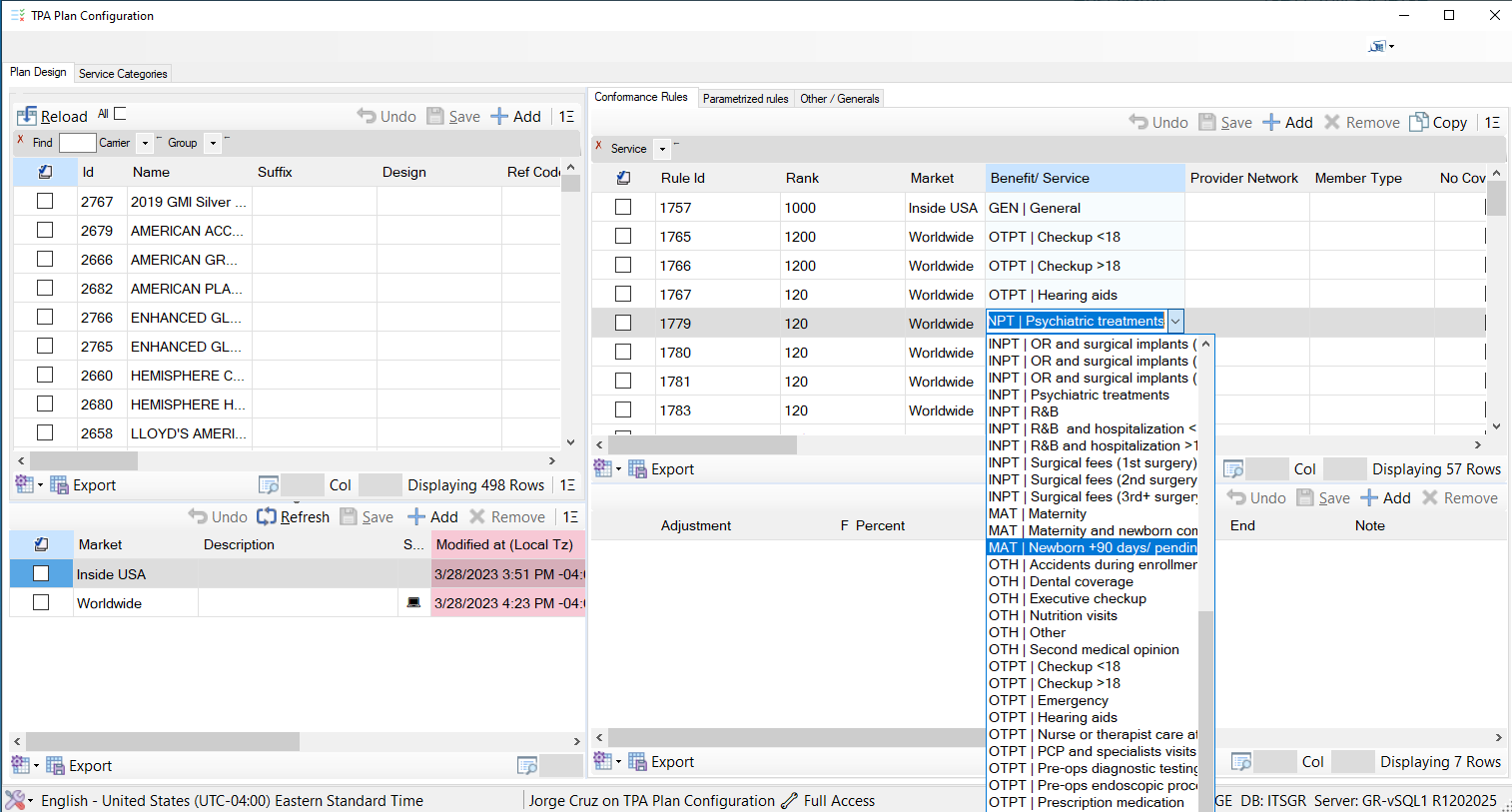
- Several views cooperate. Selecting a plan or market determines the related rules shown beside it; each region keeps the same command, navigation, and status grammar.
- Editors are chosen from configuration. The open Benefit/Service cell is a lookup combo whose valid options are supplied by data, not a dropdown written specifically for this form.
- The cell remains part of the grid. Selection, keyboard navigation, validation, change tracking, and save behavior continue through the common control while the specialized editor is active.
+----------------------------------------------------+
| TSEdt       dynamic command toolbar                |
+----------------------------------------------------+
| TFltr       metadata-driven filters                |
+------------+---------------------------------------+
| CntrlP     | CntrlG                                |
| current    | tabular entity view                   |
| row        |                                       |
+------------+---------------------------------------+
| PnlAGG     aggregates                              |
+----------------------------------------------------+
| status and validation summary                      |
+----------------------------------------------------+
| navigation, find, export, presets, totals          |
+----------------------------------------------------+
The Init moment
A hosting form can call ctrlV.Init("VClaims", pars, this). That call identifies the logical view; the runtime performs the rest of the choreography:
- Resolve the
Vconfiguration row from the hydrated cache. - Initialize
CntrlGwith its styles, editors, validation, and dataset binding contract. - Materialize the top command toolbar from command rows.
- Bind, clone, share, or filter the source table according to dataset metadata.
- Subscribe to named dataset refresh events so views rebind consistently.
- Create aggregates and status panels when configured.
- Create the filter bar and load user column presets.
- Optionally attach
CntrlPto the grid’s current row.
Commands as rows
Toolbar buttons are configuration records rather than designer controls. A command row describes label, icon, order, permission, visibility, enabled-state rule, selected-row mode, confirmation, and the action identifier delivered to the host.
Standard commands such as refresh, find, export, save, navigation, preset selection, and totals can be supplied by the framework. A module subscribes only when a command represents genuinely new business behavior.
Filters, aggregates, and status
Filter rows describe editor type, target column or expression, default value, lookup source, and whether a change applies immediately. Applying a filter updates DataView.RowFilter; it does not rebuild an object query or fetch the same graph repeatedly.
Aggregates operate over the same visible or selected rows. Validation status flows from the same row-level Message Codes. The controls do not maintain competing interpretations of the entity: grid, toolbar, filters, pivot, aggregates, and status all observe the same data.
CntrlP: The Grid Pivoted 90 Degrees
CntrlP edits one DataRow as a vertical property sheet. It is not a separately designed form for each entity. It projects the entity’s configured columns into property rows containing a label and current value, then renders that projection through a specialized CntrlG.
The same metadata and mechanisms therefore remain active:
- Read-only properties receive computed decoration.
- Dirty values display a change marker derived from comparison with the original row.
- Booleans, lookups, dates, hyperlinks, and dialog-backed properties use the same editor dispatch.
- Validation errors use the standard grid error surface and the common validator.
- A find-field box can filter large property lists by label or value.
- Save validates the working row and merges it into the source row or sends it through the DAL persistence contract.
- Cancel restores the original values without reconstructing an entity.
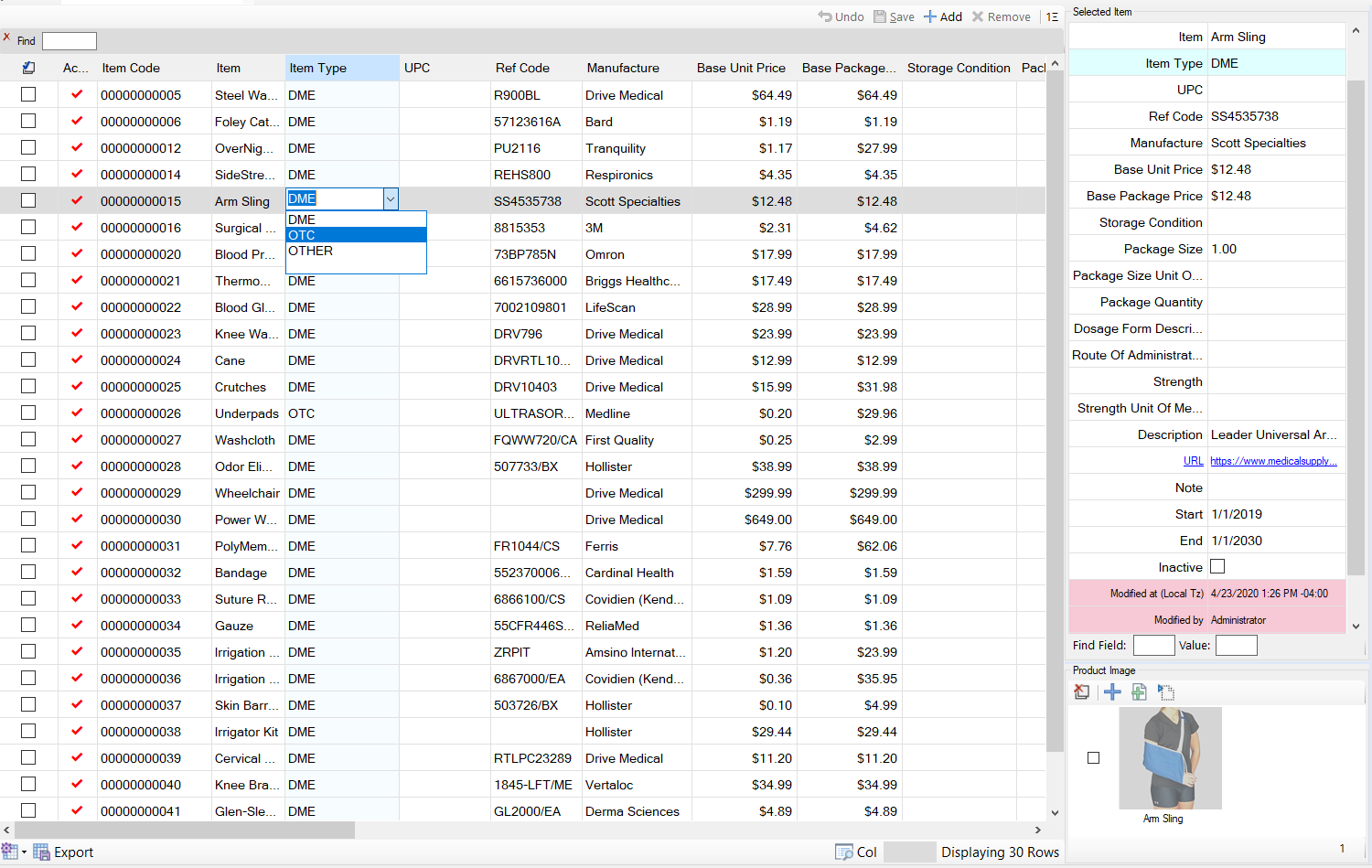
CntrlV presents the item collection on the left; CntrlP begins at Selected Item on the right and presents the current Arm Sling row as labeled properties. The Product Image panel below is a separate related view.- A configured combo is active. The Item Type cell in
CntrlVopens the valid choices DME, OTC, and OTHER directly inside the grid. CntrlPpreserves the editor contract. Lookups, checkboxes, dates, formatted values, read-only audit fields, and other specialized cells retain the same configured behavior when the row is displayed vertically.- The URL is behavior, not decoration. The blue underlined URL property is an active hyperlink cell. Its link behavior comes from the configured cell type rather than from code written for this item screen.
Related Video: CntrlP in Motion
The live sequence below shows a User entity rendered as a Pivot Row inside Entity Management. Scrolling, lookup selection, boolean editing, date editing, and audit navigation all remain inside the common property-grid surface.

What to watch: User entity at 00:00 · ComboBox at 00:03 · checkboxes at 00:08 · date picker at 00:10 · audit history at 00:12. The production capture was reviewed before publication and confidential information was removed.
When a new database column and its column metadata are deployed, the list can display it and the pivot can edit it on the next open. The behavior travels with the column instead of being hard-coded into a particular form.
How the Mismatch Dissolves
| Classical symptom | ITS Framework response |
|---|---|
| A property must be added to entity, DTO, mapping, view model, grid, editor, validator, and translation. | The database column and metadata row define the property once; the common controls materialize it. |
| The DTO drifts from the persisted entity. | There is no DTO in this internal runtime path; the DataRow remains the entity. |
| A separate change tracker loses synchronization. | DataRowState and DataRowVersion carry native change and value-version tracking. |
| Validation is split across attributes, UI handlers, and service code. | Validation metadata resolves through expressions or stored procedures into a shared Message Code status. |
| The staging screen differs from the deployed database contract. | Screen shape and behavior are configuration datasets that can be diffed and promoted with the database release. |
| Tenant or language variation requires binary forks. | Scoped metadata, translations, permissions, and styles change while the binaries remain the same. |
This does not mean the system contains no code. It means framework code implements each general mechanism once, stored procedures implement authoritative data operations, metadata describes variable behavior, and L7 modules contain only behavior that is genuinely specific to the business.
What It Costs to Extend the Application
A new property on an existing entity
ALTER TABLE Facility
ADD email varchar(200) NULL;

-- Register label, format, editor, validation, width,
-- permissions, and optional filtering as metadata rows.
The configured list displays the property, the pivot edits it, exports include it when allowed, and validation and permissions apply through the shared runtime. No entity class, DTO, view model, or designer form changes.
A new list-based screen
Add a V row, the required VS column rows, optional filter and command rows, and a module-registry entry that opens the generic host with the new view name. The result is a distinct business screen using the standard grid, filters, commands, permissions, exports, and status model.
A parent-detail composite
Composer rows identify panels, docking, named datasets, and cross-filter relationships. The recursive group composer instantiates CntrlV and CntrlP controls and wires navigation at runtime.
Behavior metadata cannot express
Some requirements are actual code: external integrations, specialized workflows, or domain algorithms. Those belong in a focused L7 assembly. The module initializes the standard controls and handles only the new behavior. Data access, editors, validation, exports, permissions, caching, tasks, and diagnostics remain platform responsibilities.
If a change describes what the user sees or how configured data flows, it is usually metadata. If it introduces genuinely new behavior, it belongs in a small module. The framework itself should not need modification.
Why This Architecture Fits Its Operating Environment
The ITS Framework desktop runtime targets .NET 10 for Windows and runs on controlled application servers close to SQL Server. Users connect through RDP or RDS and receive pixels and interaction events. The WinForms process, DAL, metadata caches, and database remain within the trusted enterprise environment.
That proximity changes the architecture’s economics. The DAL can hydrate a related DataSet in one contract, the UI can navigate master-detail relationships in memory, and structured changes can return through stored procedures without placing a public HTTP/JSON API between the internal grid and SQL Server.
This is a deliberate deployment-specific design, not a universal prescription. A public browser application, offline mobile client, untrusted network, independently versioned partner integration, or public API needs explicit service contracts, authorization boundaries, transport semantics, and versioning independent of the internal relational schema.
Objections and Tradeoffs, Honestly Answered
“You moved code into the database.”
The configuration is executable behavior, but it is structured data rather than arbitrary application source. It can be constrained by foreign keys, edited through governed tools, audited, diffed through DataSet.GetChanges(), serialized with WriteXml(), versioned, tested from frozen snapshots, and promoted with releases.
The tradeoff is real: configuration errors are not all caught by the C# compiler. The runtime therefore needs metadata validation, referential integrity, startup checks, diagnostics, and disciplined release governance.
“You lose IntelliSense on the entity.”
Yes. In return, the runtime gains one uniform row vocabulary and the ability to discover schema at runtime. Extension methods provide typed access at the call site, and generators can expose constants or accessors where compile-time assistance is valuable. The choice favors runtime openness over a separate class for every table.
“The DataGridView is old.”
It is mature. It already solves keyboard navigation, clipboard integration, virtualization, accessibility, selection, editing, and DPI behavior. ITS Framework invests in the metadata contract above the renderer. A future renderer could consume the same definitions, but replacing a proven control solely because it is mature would add risk without adding business value.
“Metadata cannot represent every domain.”
It does not need to represent every algorithm. It must describe the recurring presentation, validation, command, filtering, permission, and persistence patterns. The remaining edge cases become focused modules that still use the common controls. The goal is not zero code; it is zero repetition of solved infrastructure.
Operational costs
- Dynamic configuration moves some failures from compilation to initialization or screen-open time.
- Powerful metadata requires names, keys, conventions, validation tools, and ownership discipline.
- Shared caches and multi-threaded modules require thread-safe access and controlled event dispatch.
- Database authority demands coordinated schema and metadata releases.
- Direct row contracts couple this trusted client runtime intentionally to the database contract.
The Medium Is the Truth
CntrlG is a grid that reads its definition. CntrlV is a business view that reads its commands, filters, aggregates, and status. CntrlP turns the same entity and metadata into a property editor. All three consume the same DataRow entities that the DAL retrieved and will persist.
When the database is allowed to remain authoritative about entity shape and configured behavior, the translation border disappears. The improvement is not merely fewer classes. It is a smaller change surface, one implementation of each common mechanism, and a system in which the rows developers inspect are the rows users see.
That is the mismatch, killed—not by a better mapper, but by a UI that finally speaks the database’s native language.