Revision history: originally published August 1, 2018; revised March 22, 2020; revised November 23, 2025.
This article is the assembly-level companion to The ITS Framework Component Architecture. That article explains why the layers exist and how the runtime composes an application. This one supplies the concrete catalog that populates those layers.
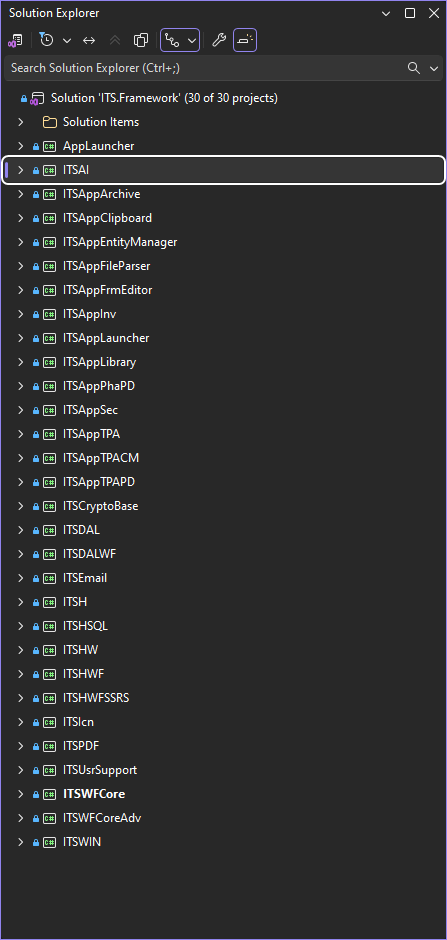
ITS.Framework, from the host and shared services through data access, WinForms infrastructure, and pluggable business modules. The catalog below explains the responsibility and architectural position behind those project names.How to Read the Catalog
Each entry answers three questions: what the assembly owns, which lower-level assemblies it uses, and which higher-level components use it. “Uses” describes a compile-time dependency unless the entry explicitly says that reflection is involved.
The important architectural unit is not merely a DLL name. It is the ownership boundary represented by that DLL.
The catalog is specific to the ITS Framework operating model: trusted WinForms modules execute on application servers close to SQL Server, and users interact through RDP or RDS. It is not a blanket recommendation for browser applications, offline clients, public APIs, or untrusted networks.
The desktop assemblies in this catalog target .NET 10 for Windows (net10.0-windows). ITSV Web remains a separate ASP.NET Web Forms application on .NET Framework 4.8; it is not the runtime target of these assemblies.
Naming Conventions
The assembly names encode architectural intent. Once those conventions are understood, much of the dependency graph becomes readable without opening a project.
| Prefix or suffix | Meaning | Examples |
|---|---|---|
ITS | Base namespace of the framework. | ITSH, ITSDAL |
H | Dependency-light helper functionality. | ITSH, ITSHSQL, ITSHWF |
W | Windows-specific, non-UI behavior. | ITSHW, ITSWIN |
WF | Windows Forms UI dependency. | ITSHWF, ITSDALWF, ITSWFCore |
DAL | Data access, named datasets, and parameter resolution. | ITSDAL, ITSDALWF |
Core | Metadata-driven UI primitives and compositions. | ITSWFCore, ITSWFCoreAdv |
App | Pluggable L7 business module loaded by reflection. | ITSAppLauncher, ITSAppArchive |
| Domain name | Cross-cutting L2 service. | ITSIcn, ITSEmail, ITSPDF |
Chained suffixes stack their meaning. ITSHWFSSRS is a helper for Windows Forms and SQL Server Reporting Services. ITSDALWF is the bridge between DAL data contracts and Windows Forms controls.
Naming exception: ITSUsrSupport is an L7 business module despite not carrying the App prefix. Its historical name remains for continuity, but it follows the same architectural rules as every ITSApp* assembly.
L0–L1: Host and Foundation
AppLauncher.exe — the host process
The single native executable boots the framework, validates the installation, initializes security, hydrates configuration, and hands control to ITSAppLauncher. It also owns native binaries, such as WebView2Loader.dll, that reflection-loaded modules cannot independently carry.
- Uses:
ITSAppLauncher, indirectly through the module registry and reflection. - Used by: nothing; it is the entry point.
ITSH.dll — the framework’s runtime language
This dependency-light foundation contains the vocabulary shared by the rest of the platform: extensions over string, DataRow, DataSet, dictionaries, images, files, and controls; generic and specialized caches; Message Codes; mini-DSLs such as TPars and SQLPMetas; concurrency primitives; EvQueue; and expression-driven validation.
- Uses: only the .NET base libraries.
- Used by: every other framework assembly.
L2: Cross-Cutting Services
These services are peers. Each packages one reusable capability, and none needs to become a general-purpose dependency of another service.
| Assembly | Responsibility | Uses / principal consumers |
|---|---|---|
ITSHSQL | SQL Server provider surface: connections, UDTT construction, stored procedures, conversions, and retry. | Uses ITSH; consumed by ITSDAL. |
ITSHW | Windows APIs without UI: WMI, processes, services, RDS sessions, machines, monitors, DPI, and themes. | Uses ITSH; consumed by ITSHWF, ITSWIN, and selected modules. |
ITSWIN | Supervision and integration of external processes as shell children. | Uses ITSH and ITSHW; consumed by the shell and process-hosting modules. |
ITSIcn | Process-wide named-icon dictionary with a lock-free hot path and missing-icon reporting. | Uses ITSH; consumed throughout the WinForms layers. |
ITSEmail | SMTP sending, MIME and .eml parsing, and attachment extraction. | Uses ITSH; consumed by archive and mail-enabled modules. |
ITSPDF | PDF generation, merging, printing, and viewer integration. | Uses ITSH; consumed by archive, reporting, and SSRS integrations. |
ITSAI | Facade over AI providers for chat, completions, and embeddings. | Uses ITSH; consumed only by modules that expose AI behavior. |
ITSCryptoBase | Hashing, signing, token generation, and key storage. | Uses ITSH; consumed by DAL, security, and launcher components. |
L3: Data Access Layer
ITSDAL.dll — the contract with the database
ITSDAL is the authoritative data entry point. It resolves named datasets such as (DAL)"ClaimDetails", owns the SqlParList and IAddSQLPar parameter chain, maintains prototype datasets and returns clones, carries SC.Cntxt, and coordinates retry, logging, transactions, Message Code translation, and UDTT bulk persistence.
- Uses:
ITSH,ITSHSQL, andITSCryptoBase. - Used by:
ITSDALWFand every layer above L3. Higher layers do not bypass it.
This is why the DAL is more than a SQL helper or repository facade. It resolves a runtime contract expressed through named data, context, conventions, and structured persistence.
L4: UI Helpers and Data Bridge
ITSHWF.dll — WinForms helper
Owns control-tree traversal, DPI-aware drawing, theme helpers, WinForms image behavior, and safe UI marshaling. This boundary keeps System.Windows.Forms out of ITSH and ITSDAL.
- Uses:
ITSH,ITSHW, andITSIcn. - Used by:
ITSDALWF,ITSWFCore, and L7 modules.
ITSDALWF.dll — data-to-UI bridge
Provides smart binding sources, dataset-to-grid integration, and controllers that feed controls from named DAL datasets. It allows a grid to bind to ClaimDetails without knowing SQL.
- Uses:
ITSH,ITSHWF, andITSDAL. - Used by: the UI core and business modules.
ITSHWFSSRS.dll — SSRS inside WinForms
Embeds and drives SQL Server Reporting Services reports inside WinForms hosts.
- Uses:
ITSH,ITSHWF,ITSDAL, andITSPDF. - Used by: modules that surface SSRS reports.
L5–L6: UI Core and Advanced UI
ITSWFCore.dll — the metadata-driven UI engine
This is where “UI is data” becomes operational. It contains the dynamic grid CntrlG, the row-oriented property editor CntrlP, the composite view CntrlV, recursive group composition through CtrlEdtrGrp, cross-filtering, and status validation hosted on DataColumn.Expression.
- Uses:
ITSH,ITSHWF,ITSDAL,ITSDALWF, andITSIcn. - Used by:
ITSWFCoreAdvand every business module.
ITSWFCoreAdv.dll — high-level compositions
Combines L5 primitives into complete editors, dashboards, complex pivots, and wizards. Its role is composition: a genuinely new reusable primitive belongs in L5.
- Uses: the foundation, DAL, UI bridge,
ITSWFCore, and icon service. - Used by: most L7 business modules.
L7: Business Modules
Every ITSApp* assembly is a pluggable business module registered in ITSC_M and loaded by reflection. Modules consume lower layers but never reference one another. Coordination occurs through data contracts and shared runtime services.
Shell and general-purpose modules
| Assembly | Role |
|---|---|
ITSAppLauncher | Application shell: menus, registry lookup, task manager, caches, session state, layouts, and module coordination. |
ITSAppArchive | Universal document archive with viewers, .eml parsing, versioning, search, and email integration. |
ITSAppSec | Users, roles, groups, permissions, session policies, audit, and security-context population. |
ITSAppEntityManager | Metadata-driven master-data editor whose business identity changes through configuration. |
ITSAppFrmEditor | Visual editor for the framework configuration tables. |
ITSUsrSupport | Operational dashboard for caches, sessions, tasks, and Message Code diagnostics. |
ITSAppFileParser | Configuration-driven interchange for fixed-width, delimited, XML, JSON, and EDI files. |
ITSAppClipboard | Clipboard integration module. |
Domain packs
| Assembly | Role |
|---|---|
ITSAppLibrary | Healthcare reference-content library. |
ITSAppTPA | Julia operational dashboard. |
ITSAppTPAPD | TPA plan design. |
ITSAppTPACM | Claims management and umbrella/member policies. |
ITSAppPhaPD | Pharmacy plan design. |
ITSAppInv | Inventory items. |
At compile time, nothing consumes these modules. AppLauncher.exe discovers them from the registry and loads them through reflection. This is the boundary that allows the platform to gain business capabilities without recompiling the host.
The Dependency Graph in One Picture
AppLauncher.exe (L0)
        | reflection
        v
ITSApp* business modules (L7)
        |
        v
ITSWFCoreAdv (L6)
        |
        v
ITSWFCore (L5)
        |
        +------------+----------------+
        v            v                v
    ITSDALWF    ITSHWFSSRS        ITSHWF (L4)
        |            |                |
        +------------+----------------+
                     v
                  ITSDAL (L3)
                     |
        +------------+----------------+
        v                             v
     ITSHSQL                 L2 services / Windows
        |                             |
        +--------------+--------------+
                       v
                    ITSH (L1)
                       |
                       v
                     .NET
The diagram simplifies optional service references, but preserves the governing rule: dependencies move toward lower-level contracts; L7 modules do not point sideways to peer modules.
Quick Reference: Which DLL Should I Open?
| I need to work on… | Open… |
|---|---|
A string, DataRow, cache, validation, or Message Code primitive | ITSH |
| A SQL provider detail, UDTT, connection, or retry | ITSHSQL |
| A named dataset, parameter chain, or security context | ITSDAL |
| WMI, processes, services, or machine information | ITSHW / ITSWIN |
| A WinForms traversal, DPI, theme, or marshaling helper | ITSHWF |
| Binding a control to a named dataset | ITSDALWF |
| A grid, property editor, or dynamic panel | ITSWFCore |
| A composite editor, dashboard, pivot, or wizard | ITSWFCoreAdv |
| Icons, email, PDF, AI, or cryptography | The corresponding L2 service |
| An SSRS report host | ITSHWFSSRS |
| A specific business capability | The matching ITSApp* module |
| The host boot sequence or shell | AppLauncher + ITSAppLauncher |
Boundaries and Tradeoffs
- Assembly boundaries improve ownership only when reference rules are actively enforced; naming alone cannot prevent erosion.
- Reflection keeps the host independent of business modules, but moves some failures from compile time to deployment or module-open time.
- Shared services and caches reduce per-session duplication, but demand thread-safe state and disciplined module lifecycle management.
- The database-centered DAL contract fits a controlled application-server environment close to SQL Server. Public web systems and independently versioned clients need a different trust and contract boundary.
- A capability used by several modules should move to the lowest layer that truly understands it, not into a peer module that happens to implement it first.
The Lowest Responsible Layer
If a change appears to require several assemblies, begin with the lowest layer that has enough context to own it correctly. Expose the behavior there through a stable contract and allow the components above to consume it.
The assembly catalog is therefore more than a directory. It is a decision system: it tells the team where a responsibility belongs, which dependencies are legitimate, and how new capability can enter the framework without turning its component graph into a web of exceptions.